 EntryCatch
 Why QuickBooks Online keeps changing your invoice date (we tested it)
Short answer: QuickBooks Online doesn't start new transactions on today's date. It uses the date of the last new transaction you saved, of any type: a payment, an expense, a bill, even an estimate. Record a payment from last week, and your next invoice is dated last week too. There's no setting in QuickBooks Online to change this, and turning off Pre-fill doesn't touch the date.
It looks random, but it isn't
A post on r/QuickBooks this month describes it well. Someone creates 30 to 40 invoices a day. Every so often a new invoice opens with an older date: yesterday, a week ago, a month ago. They cleared the cache and turned off automation. Nothing helped.
Intuit's community has threads like this going back to at least 2019. The usual answers are to turn off Pre-fill, clear the cache or try another browser. We wanted to know what actually sets the date, so we tested it.
How we tested it
We used Intuit's QuickBooks Online Test Drive, the demo company anyone can open without an account.
- We saved a new invoice dated today, October 22. The next new invoice opened with today's date, as you'd expect.
- We recorded a customer payment and changed its payment date to October 12, ten days earlier, then clicked Record and close.
- We opened a new invoice. Its invoice date was 10/12/2026. Its due date, on Net 30 terms, was 11/11/2026, counted from the wrong date.
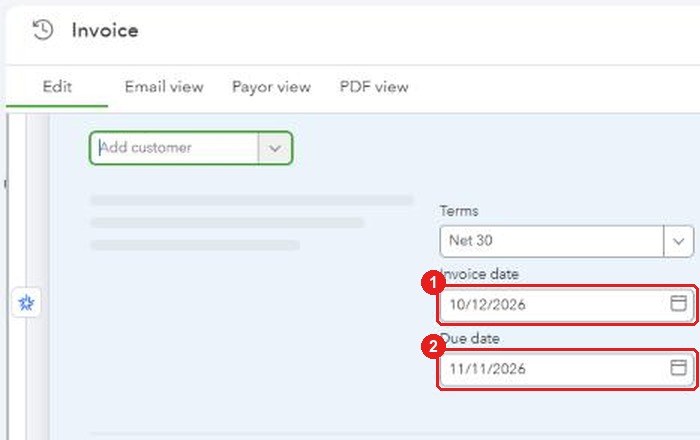
Reloading the page didn't clear it, and neither did opening a new tab. We searched the browser's storage and the date wasn't there, so it's almost certainly kept by QuickBooks itself. That's why clearing your cache or switching browsers makes no difference.
Then we went through every transaction type and save button we could find.
What sets the date, and what doesn't
These set the date for your next new transaction
- Saving any new transaction. Invoices, estimates, sales receipts, received payments, expenses, checks, bills and journal entries all count, whichever save button you use.
- Future dates. Save a postdated check, and your next invoice is postdated too.
- A save that fails. We clicked Save, QuickBooks showed an error and saved nothing, and the next new invoice still picked up that date. We saw this twice.
- Restoring a draft. The new invoice form offers "Restore draft". If you restore it, you get the draft's old date back.
These don't change it
- Opening or viewing an old transaction.
- Editing an existing transaction and saving it, even if you change its date.
- Typing a date into a new form and leaving without saving.
- Turning Pre-fill on or off.
Saving a new transaction dated today puts things back to normal: the next one defaults to today again, until someone saves something older.
The date also carries across transaction types. A bill sets the date of your next check, and a check sets the date of your next invoice. That's what makes it so hard to spot: the date comes from a different screen than the one you're looking at. In the Reddit case, a payment recorded or an expense entered between invoices is the most likely source of each odd date.
Why turning off Pre-fill doesn't help
The most common advice is to go to Settings, then Account and settings, Advanced, Automation, and turn off "Pre-fill forms with previously entered content". It doesn't work for this, and Intuit's own help article explains why: auto-recall fills in the rest of a transaction "excluding the date", and on invoices and sales receipts the only thing it remembers is the location. In our tests, the date behaved exactly the same with Pre-fill on or off.
Even the answers on Intuit's community go both ways. Some say to turn Pre-fill off, an older one says to turn it on, and others blame the cache or the computer's clock.
Is there a setting to default to today's date?
Not in QuickBooks Online. QuickBooks Desktop has one: under Edit, Preferences, General, My Preferences, you can choose "Use today's date as default" or "Use the last entered date as default". QuickBooks Online has no equivalent. Intuit staff have said so on the community since at least 2022, and as recently as May 2026 the answer was still to send feedback.
What a wrong date costs
- Due dates move. The due date is counted from the invoice date, so the customer gets less time than your terms say, and reminders go out early.
- Sales land in the wrong period. An invoice dated last month shows up in last month's numbers, possibly after you've reviewed them or filed sales tax for that period.
- Customers notice. One user on Intuit's Australian community had a customer call about an invoice that went out with a future date, picked up from a postdated check.
What about copied invoices?
This is a separate issue. Since late September 2026, users on Reddit and Intuit's community have reported that copies made with Duplicate or Make a copy keep the original's date instead of today's. Intuit's help article on duplicating invoices still says the copy gets today's date, and in an October thread on Intuit's community the team acknowledged the problem.
When we tested copies on October 24, the results depended on the transaction type. Copied invoices and estimates opened with the current date. A copied credit card expense kept the original's date. If you copy transactions, look at the date before you save the copy.
How to find invoices that already went out with the wrong date
The Transaction List by Date report can show you when each invoice was actually created:
- Go to Reports and open Transaction List by Date.
- Click Customize. Under Filter, set Transaction type to Invoice.
- Under Columns, add Created on, then apply the changes.
- Look for invoices whose Date is earlier than their Created on date. Some are backdated on purpose, like catch-up entries. The rest are the ones to fix.
Save it as a custom report so you can run it again. The audit log can also show you who created a transaction and when.
Catch it before you save
A report finds the mistake after it's made. We built EntryCatch, a Chrome extension for QuickBooks Online, to catch it before you hit Save:
- When a new form opens with a date that isn't today, EntryCatch outlines the date and tells you where it came from. Use today or keep the date with one click.
- Or set a transaction type to change to today automatically, with an Undo button in case you meant it.
- If a date that isn't today is about to be saved and you haven't confirmed it, EntryCatch asks first.
- You choose what happens for each transaction type, because payments, expenses and journal entries are often backdated on purpose.
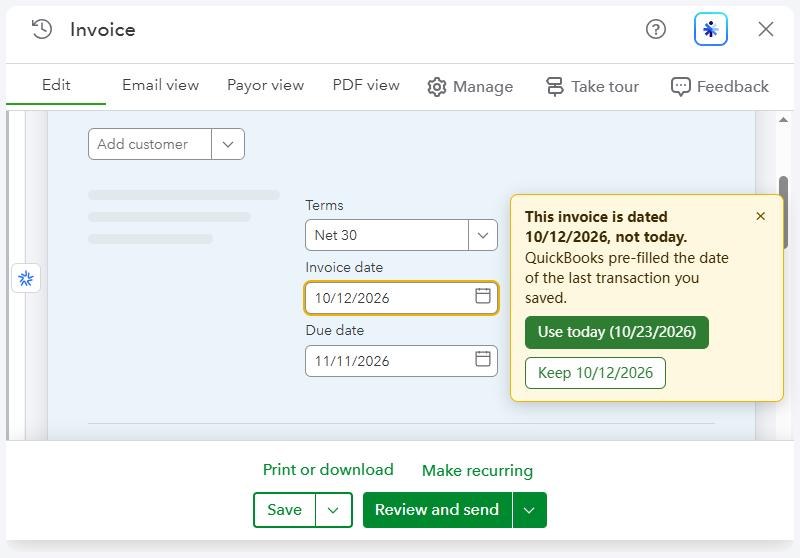
It runs only on QuickBooks Online and doesn't collect or send any data. See the privacy policy.
EntryCatch is in review at the Chrome Web Store. Email us and we'll send you the install link as soon as it's live.
Sources
- Our tests: QuickBooks Online Test Drive (US), October 22 and 24, 2026. QuickBooks Online changes often. If you see different behavior, tell us.
- Intuit: Use auto-recall to pre-fill transactions
- Intuit: Duplicate an invoice or an estimate
- QuickBooks Community: Default date preference in QBO
- QuickBooks Community: Is there an option to set the default date to today's date?
- QuickBooks Community: Default date setting
- QuickBooks Community: Dates on Invoice
- QuickBooks Community: When I make a copy of an invoice or estimate, it defaults the copy to the date the original was created